Digital signage, simplified

Turn any TV into a screen that sells.

Build playlists, schedule content by daypart, and manage every screen across every location — from one clean dashboard. Plays on Android TV, Fire TV and the web.

Per-screen pricing from £6.95/mo · Cancel anytime · Free trial available

Trusted by cafés, bars, gyms and retailers across the UK

Everything you need

One platform for your whole screen network

From a single café TV to a fleet across the country — OrbiSignage keeps every screen on-brand, on-schedule and online.

Playlist builder

Drag-and-drop images and video into playlists with per-item durations and smooth transitions.

Dayparting schedules

Show breakfast at 8, lunch at 12, happy hour at 5 — priority-based schedules switch content automatically.

Synced playback

Group screens in a venue so a video wall plays perfectly in step across every panel.

Offline-first playback

Media downloads to each screen and plays from local storage — so a dropped connection never stops the show.

Plays on any TV

Android TV, Amazon Fire TV, commercial displays and the web. Pair a screen in seconds with a 6-digit code.

Proof of play

Know exactly what played, where and when — export CSV reports for compliance and advertisers.

Up and running in minutes

Three steps to your first screen

1

Create your account

Sign up free, set up your company, and invite your team with the right access for each role.

2

Pair a screen

Open the OrbiSignage app on your TV, enter the 6-digit code in the dashboard — paired instantly.

3

Publish content

Upload media, build a playlist, hit publish. Your screens update over the air in seconds.

See it in action

The fastest way to run your screens

Build content, schedule it by daypart, and keep every screen online, all from one clean dashboard.
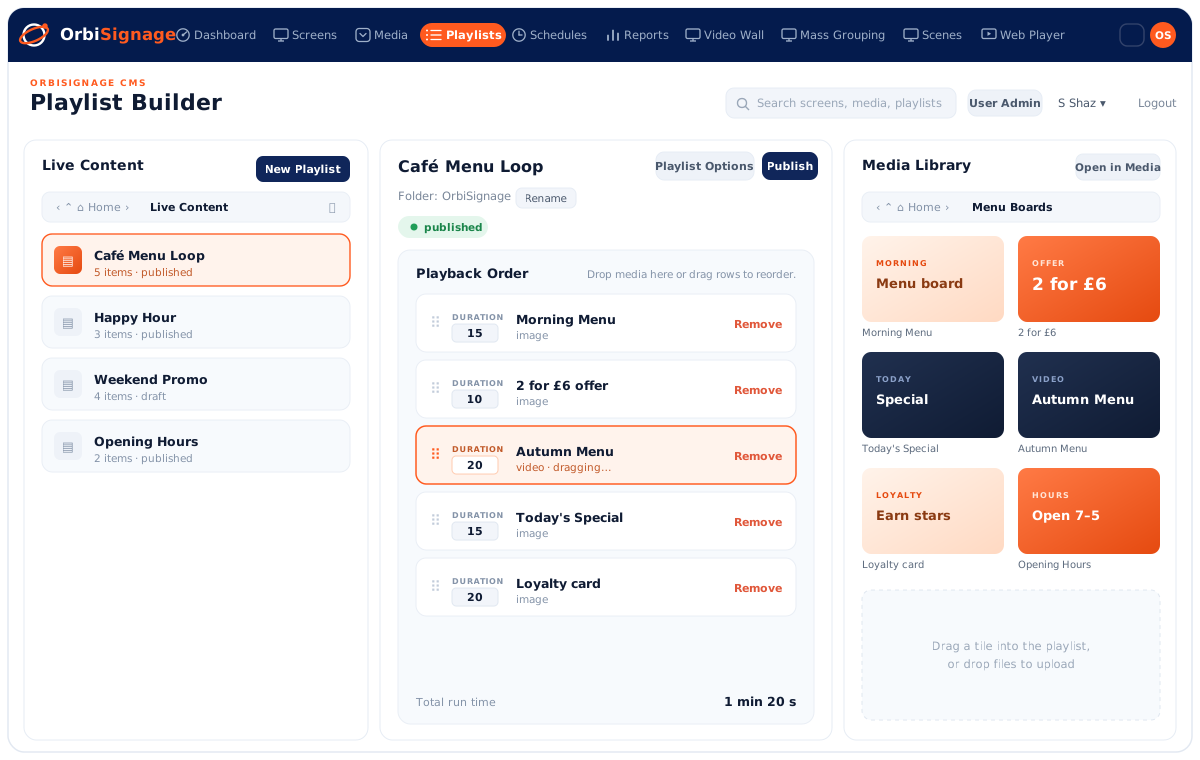
OrbiSignage Playlist Builder: a Live Content list on the left, a Café Menu Loop playlist's Playback Order with a duration set for each item in the middle, and a Media Library panel to drag assets from on the right.

Build a playlist in minutes

Drag assets from your media library into a playlist's playback order, set how long each item stays on screen, and hit publish. Your screens update over the air in seconds.
  • Drag assets straight in from your media library
  • Set a duration for every item, then reorder by dragging
  • Publish to a screen, a folder, or your whole estate
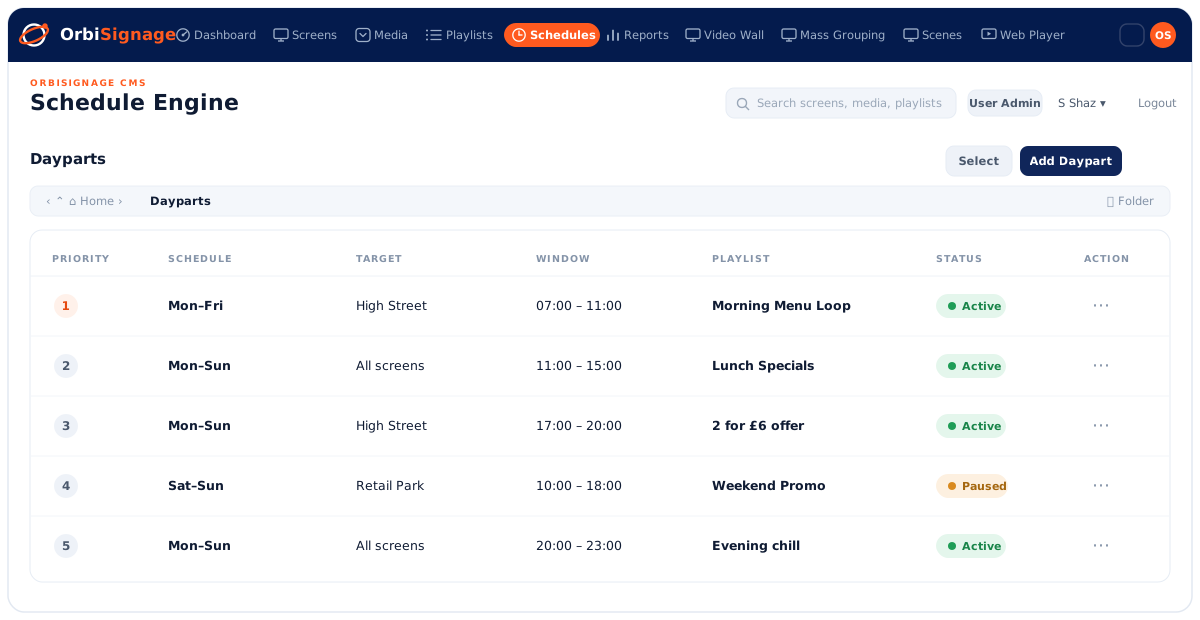
OrbiSignage Schedule Engine: a Dayparts table listing rules by priority, with the days they run, the target screens, the time window, the playlist to play, and an active or paused status for each.

The right content at the right time, automatically

Show the breakfast menu in the morning, lunch specials at noon, the happy-hour offer at five. Priority-based dayparts switch your screens through the day, so you never have to.
  • Time-of-day rules, targeted by screen or by site
  • Priority decides which rule wins when two overlap
  • Active or paused, every rule in one clear table
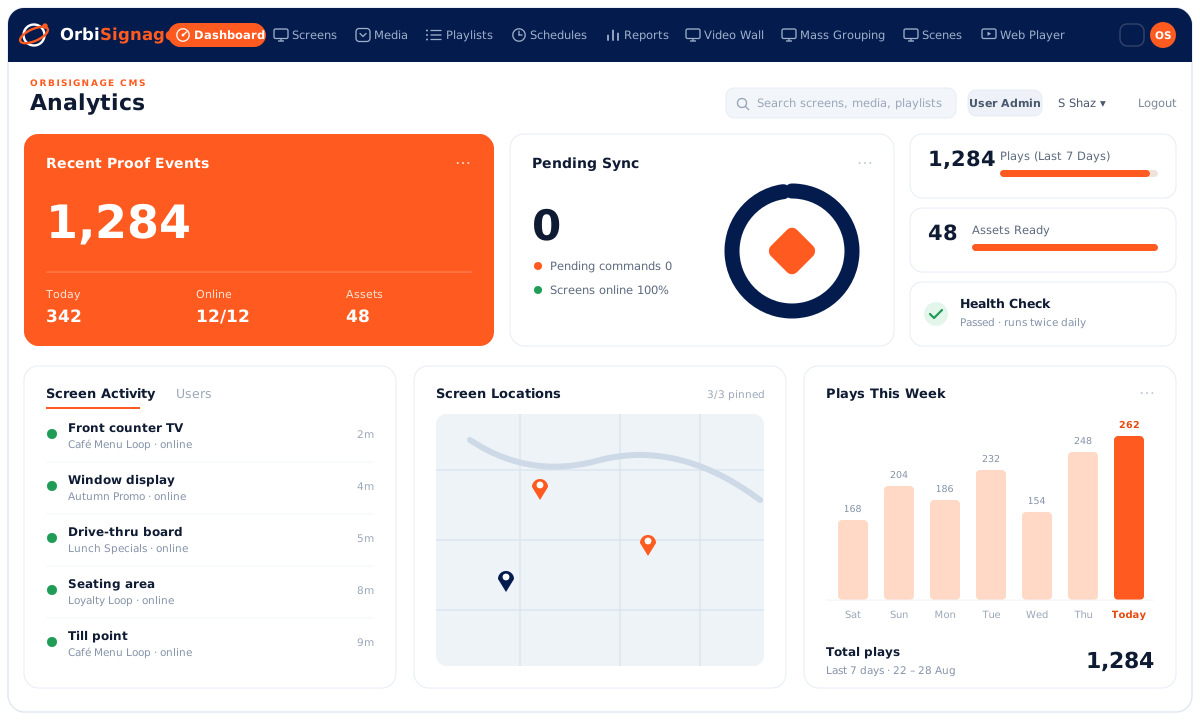
OrbiSignage Analytics dashboard: recent proof-of-play events, pending sync status, plays this week as a bar chart, and live screen activity and locations across every venue.

See everything at a glance, with proof of play

Recent plays, sync status, screen activity and a full proof-of-play trail, across every location, on one dashboard. Spot an offline screen the moment it drops, and export a report whenever you need one.

  • Recent proof-of-play events and plays this week
  • Live status and activity for every screen and site
  • Export a full proof-of-play report to CSV
Coming in OrbiSignage 2.0

A sneak peek at what's next

We're building the tools that turn your screens from a playlist into a marketing engine, richer promotions, bigger moments, and every location updated in one click. Here's an early look.

Coming soon

Scenes, layered promotions

Drop editable text and image layers over any video or playlist, your price, your offer, your logo, on top of moving content. Change the message in seconds without re-editing a single video.

Coming soon

Timed layer groups

Link a layer to the exact moment it matters, so an offer appears only while its clip plays, then fades or slides away. Perfectly timed messaging that feels produced, not pasted on.

Coming soon

Video Wall

Spread one piece of content across a grid of TVs for a seamless, frame-synced wall. Turn a row of screens into a single showstopping canvas that stops people in their tracks.

Coming soon

Mass Grouping

Manage the same screen across every site as one group, then deploy or schedule a campaign to your whole estate in a single click. National rollouts in the time it took to update one screen.

The next chapter

OrbiSignage 2.0

A bigger, bolder way to run your screens, richer promotions, perfectly timed messaging, and campaigns that launch across every location at once.

Start free, be first to try it

How OrbiSignage 2.0 helps you shape your marketing

  • Say more without more work. Layer live prices and offers over evergreen video, so one clip does the job of ten.
  • Right message, right moment. Time promotions to the daypart and the exact scene, breakfast at 8, the meal deal at noon, happy hour at 5.
  • Launch everywhere at once. Push a campaign to every location in one action, so every store looks on-brand and up to date on day one.
  • Make a bigger impression. Video walls and richer scenes give your promotions the kind of presence that drives footfall and upsell.

Rolling out to customers with OrbiSignage 2.0. Want an early look? Start free and we'll keep you posted.

99.9%Player uptime
£6.95/moFrom, per screen
3 platformsAndroid TV · Fire TV · Web
60sTo pair a screen
Simple per-screen pricing

Pay for the screens you run

No bundles, no surprises. Scale up or down anytime. Prices shown per screen, per month.

Free trial

Try OrbiSignage free on up to 3 screens for 7 days with 250MB of storage. Includes the OrbiSignage logo on screens. No credit card required.

Get started →
Loved by operators

What our customers say

“Every lobby and lounge screen across our properties now updates from one dashboard. Scheduling different content per location used to take a morning — it's a couple of clicks today.”

GT
Gianmarco · Tucci ItalianItalian dining

“I set up our café screens in an afternoon and now update the daily specials from my phone. The breakfast menu swaps to lunch on its own, so the team never touches the TV.”

AM
Amelia · Copper & BeanIndependent café

“We were nervous about rolling signage out at scale, but pairing screens is effortless and the offline caching means nothing goes dark if the network drops.”

SR
Simon · Retail WarehouseRetail chain
Questions

Frequently asked

What hardware do I need?

Any Android TV or Amazon Fire TV device, a commercial display that runs Android, or just a web browser. Install the OrbiSignage player, pair with a 6-digit code, and you're live. Don't have a device yet? Order pre-configured players → and start free in the same step.

How does per-screen pricing work?

You pay per active screen, per month, on your chosen plan. Add or remove screens anytime — your bill adjusts. The annual cycle saves 10%.

Does content play if the internet drops?

Yes. In offline-local mode, media is downloaded to each screen and played from local storage, so a brief outage never interrupts playback.

Can I manage multiple locations and teams?

Yes. Organise screens into folders, group them for synced playback, and give each team member the right role — from view-only to full admin.

Is there a free option?

Yes — the Free trial covers up to 3 screens for 7 days with 250MB of storage, with no credit card required.